Sunday, February 17, 2008

CYPRUS INTERNET PROVIDERS

Attempted catalog of Cyprus' Internet Providers and their TECH SUPPORT phonelines and/or sites. More details to be added as they are discovered.


CYTA
http://www.cyta.com.cy/
TELEPHONE - 132


i-choice
http://www.i-choice.cyta.com.cy/greek/
http://www.i-choice.cyta.com.cy/greek/ipostirixi.php
TELEPHONE - 80000197


CYTANET
http://www.cytanet.com.cy/
http://www.cytanet.com.cy/support/index.html
TELEPHONE - 8000-8080

POP3 mail.cytanet.com.cy
SMTP mail-out.cytanet.com.cy
PRIMARY DNS ns1.cytanet.com.cy: 195.14.133.170
SECONDARY DNS ns2.cytanet.com.cy: 195.14.130.220
PROXY www.proxy.cytanet.com.cy:8080


SPIDERNET

http://www.spidernet.net/main/default.aspx
http://www.spidernet.net/main/default.aspx?tabid=86
TELEPHONE - 22844844

POP3 nautilus.spidernet.net
SMTP nautilus.spidernet.net
PRIMARY DSN dns0.spidernet.net (194.154.128.2)
SECONDARY DNS #1 dns1.spidernet.net (194.154.129.90)
SECONDARY DNS #2 dns2.spidernet.net (194.154.154.5)
HTTP/FTP PROXY www-proxy.spidernet.net:80
DIALUP (PSTN, ISDN) 80901622


LOGOSNET
http://www.logos.cy.net/
http://support.logosnet.cy.net/ - only through LogosNet connections

POP3 pop.logosnet.cy.net
SMTP smtp.logosnet.cy.net
PRIMARY DNS 194.30.128.38
SECONDARY DNS 194.30.128.61
DIALUP (PSTN,ISDN) 80901606
PROXY proxy.logosnet.cy.net Port: 8080


NETWAY
http://netway.com.cy/
http://www.netway.com.cy/index.php?cat=20

POP3 mail.netmail.com.cy
SMTP mail.netmail.com.cy
WEB netmail.com.cy
PRIMARY DNS ns1.netway.com.cy: 81.21.45.34
SECONDARY DNS ns2.netway.com.cy: 81.21.45.35
PROXY proxy.netway. com.cy:8080
DIALUP (PSTN, ISDN) 80901611/+35780901611


OTENET
http://www.otenet-telecom.com/
http://www.otenet-telecom.com/index.php?option=com_content&task=view&id=89&Itemid=412

POP3 mail.otenet-telecom.net
SMTP smtp.otenet-telecom.net
PRIMARY DNS ns1.otenet-telecom.net
SECONDARY DNS ns2.otenet-telecom.net
WEBMAIL http://webmail.otenet-telecom.com/
TELEPHONE - 131


THUNDERWORX
http://www.thunderworx.com/main/default.aspx
http://www.thunderworx.com/main/Search.aspx

POP3 pop3.thunderworx.net
SMTP smtp.thunderworx.net
PRIMARY DNS ns1.thunderworx.net
SECONDARY DNS ns2.thunderworx.net
PROXY proxy.thunderworx.net:8080


PRIMETEL
http://www.primehome.com/main/default.aspx
TELEPHONE - 133

Athens Online Guides

Events Guide
http://eventsguide.gr/site/

Rocking.gr
http://rocking.gr/

Time Out
http://www.timeoutathens.gr/greek/default.asp

Exodos
http://www.exodos.gr/

Didi Music
http://www.didimusic.gr/

Gibson Research Corporation - grc.com

Steve Gibson is an assembly guru who really knows his shit.


(http://www.grc.com/stevegibson.htm).

The site contains many ultra-small assembly tools to patch/fix XP holes and beef up network security, as well as handy gizmos for turning off monitor from a shortcut on the desktop etc.

http://www.grc.com/default.htm


Mostly:

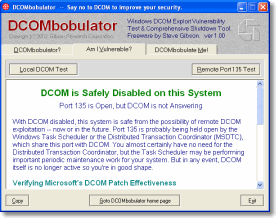
DCOMbobulator - 29KBytes


Effortlessly Tame Windows Dangerous DCOM Facility
Microsoft's DCOM security patch leaves DCOM running, open, and waiting for the next malicious exploit. DCOMbobulator allows any Windows user to quickly check their system's DCOM vulnerability, then simply shut down the unnecessary DCOM security risk."

http://www.grc.com/files/DCOMbob.exe


Shoot The Messenger - 22KBytes


"Windows Messenger Spam Elimination Freeware
In addition to being a security risk, Windows' "Messenger Service" is being used to "Spam" Windows users across the Internet.This utility gives users immediate control over the Windows Messenger service."

http://www.grc.com/files/shootthemessenger.exe

UnPlug 'n Pray - 22KBytes


"Instantly and Easily Control Windows' Insecure, Exploit-Prone and Probably Unnecessary Universal Plug and Play Network Support"

http://www.grc.com/files/unpnp.exe

IDServe 1.0 - 26KBytes


Internet server identification utility

http://www.grc.com/files/idserve.exe

"HTTP Server Identification: As stated above, and as shown in the sample screen shot above, ID Serve can almost always identify the make, model, and version of any web site's server software. This information is usually sent in the preamble of replies to web queries, but it is not shown to the user.

Non-HTTP Server Identification: Most non-HTTP (non-web) Internet servers (like FTP, SMTP, POP, NEWS, etc.) are required to transmit a line containing a numeric status code and a human readable greeting to any connecting client. So ID Serve can also connect with non-web servers to receive and report that server's greeting message. This generally reveals the server's make, model, version, and other potentially useful information.

Reverse DNS Lookup: As shown in the image above, most ID Serve users will enter a site's or server's domain name or URL. ID Serve will then use the domain name system (DNS) to determine the IP address for that domain. But sometimes it's useful to go in the other direction to determine the domain name associated with a known and provided IP. This process, known as "reverse DNS lookup", is also built into ID Serve. Simply enter any IP address and ID Serve will attempt to determine the associated domain name.

Simple Cookie Scout: If you are curious about the appearance, format, expiration, and use of a web site's browser cookies, ID Serve can be a convenient way to examine a web site's cookies without either providing or accepting that site's cookies. Simply scroll back through the "Server query processing" window to examine the "Cookie:" header lines sent by the site's web server.

Simple Port Probe: ID Serve uses the standard Windows TCP protocol when attempting to connect to a remote server and port. Just like our ShieldsUP! port probe, ID Serve will display either connection success (an open port), or connection failure. In the event of a connection failure, ID Serve determines and displays whether the port is closed or stealth. ID Serve can, therefore, be used as a simple probe of any port on any remote machine."

http://www.grc.com/files/idserve.exe

Firewall Leakage Tester 1.2 - 25KBytes


"WinXP's built-in firewall does not attempt to manage or restrict outbound connections at all. It appears to be a useful firewall for hiding the machine from the Internet (it has "stealth mode" unsolicited packet handling), but you will still need to use a good third-party personal firewall if you wish to manage and control outbound connections from your system."

http://www.grc.com/files/leaktest.exe


Shields UP!
- Excellent web-based port/security test
https://www.grc.com/x/ne.dll?bh0bkyd2

WIZMO - 35KBytes
http://www.grc.com/files/wizmo.exe

Command-Line Assembly Tool

[Wizmo Command Vocabulary]

SHUTDOWN TRIGGER COMMANDS

standby — trigger Windows' standby mode
Example: wizmo standby

hibernate — triggers Window's long-term hibernation
Example: wizmo hibernate

logoff — log off the current user
Example: wizmo logoff

reboot — restart (reboot) the computer
Example: wizmo reboot

shutdown — shutdown the computer
Shuts down all of the user's running programs, exits Windows, then powers off the machine if supported by the system's hardware.
Example: wizmo shutdown

DRIVE COMMANDS

open — opens the system's default CDROM drive tray.
Example: wizmo open

close — closes the system's default CDROM drive tray.
Example: wizmo close

open={drive:} — open or eject specific removable drive media.
Example: wizmo open=w:

close={drive:} — close or load specific removable drive media.
Example: wizmo close=r:

WINDOWS SCREEN SAVER COMMANDS

blank — activate the system's screen saver
Example: wizmo blank

autoblank={0|1} — disables/enables timed blanking
Example: wizmo autoblank=0 (disable timed blanking)

WIZMO'S SCREEN SAVER COMMANDS

blackout — blank the screen to "basic black"
Example: wizmo blackout

desktop — blank the screen to "desktop" color
Example: wizmo desktop

monoff — turns off all monitors
Example: wizmo monoff

graviton — activate Wizmo's animated screen saver
Example: wizmo graviton

shake={0-??} — set Wizmo unblanking mouse sensitivity
Example: wizmo shake=0 graviton

AUDIO CONTROL COMMANDS

quiet — suppress the "Gibson sigh" Wizmo sound
Example: wizmo quiet desktop

volume={0-100} — set the system's audio level
Example: wizmo volume=90 monoff volume=20

play={wavefile} — play the specified file
Example: wizmo play=c:\windows\media\chimes.wav

wave={0-100} — set the system's wave file audio level
Example: wizmo wave=25

mute={0|1} — control the system's audio muting
Example: wizmo mute=1

XPize 4.7 Beta 2

XPize 4.7 Beta 2

http://www.xpize.net/
http://www.msfn.org/board/Release-XPize-47-Beta-2-t102826.html

Customization (look+feel, eg icons and texts) of Windows Setup process.

XPero's utilities, Miscellaneous tools

XPero's utilities, Miscellaneous tools

http://www.msfn.org/board/XPero-s-utilities-t82191.html

Folder Type Fixer 1.0 - Folder Type Fixer restores folder types with ease.
Take Control 1.0 beta 2 - Take ownership and get full control of any system file.
Shrink It! 1.0 beta 2 - Reduce images with a single click.
eXPander 1.5 Final - Frontend for expand and makecab for Windows files.
Reg File Merger 1.0 beta - Merge multiple registry files into a single one.
DLL Register 1.0 beta - Frontend for regsvr32 which for registering dynamic-link libraries and ActiveX controls in the registry with ease.

(Require .NET Framework 2.0)

Windows Updates Downloader 2.25

Windows Updates Downloader 2.25
http://wud.jcarle.com/

Download Link:
http://www.msfn.org/board/ipb_seo.php?url=http%3A%2F%2Fwud.jcarle.com%2F

Downloader for all of the current Windows critical updates - faster and leaner than using the explorer activeX page, saves updates for later use etc.

OEMScan 1.4.1

OEMScan v1.4.1
http://xp.modrica.com/board/index.php?act=ST&f=70&t=82638

OEMScan automates multi-manufacture installation Windows XP/2003 CD's by
scanning the bios (0xE0000-0xFFFFF) for a Royalty OEM's SLP string
and copying over the appropriate OEMBIOS files for windows XP activation.

Features:
1. Scans BIOS Memory for a specific string within a customizable range.
2. Validates the OEMBIOS file set by checking the BIN/SIG/DAT hashes against the CAT file.
3. Can run a program/script and pass a custom argument for each OEM allowing you to further customize the installation.
4. OEMBIOS files pass Microsoft’s WinTrust Validation when copied over.

AutoIT 3 - BASIC-like scripting language

AutoIt v3
http://www.autoitscript.com/autoit3/

AutoIt v3 is a freeware BASIC-like scripting language designed for automating the Windows GUI and general scripting. It uses a combination of simulated keystrokes, mouse movement and window/control manipulation in order to automate tasks in a way not possible or reliable with other languages (e.g. VBScript and SendKeys). AutoIt is also very small, self-contained and will run on all versions of Windows out-of-the-box with no annoying "runtimes" required!

AutoIt was initially designed for PC "roll out" situations to reliably automate and configure thousands of PCs. Over time it has become a powerful language that supports complex expressions, user functions, loops and everything else that veteran scripters would expect.

Features:
Easy to learn BASIC-like syntax
Simulate keystrokes and mouse movements
Manipulate windows and processes
Interact with all standard windows controls
Scripts can be compiled into standalone executables
Create Graphical User Interfaces (GUIs)
COM support
Regular expressions
Directly call external DLL and Windows API functions
Scriptable RunAs functions
Detailed helpfile and large community-based support forums
Compatible with Windows 95/98/ME/NT4/2000/XP/2003/Vista
Unicode support
Digitally signed for peace of mind
Works with Windows Vista's User Account Control (UAC)

AutoIt has been designed to be as small as possible and stand-alone with no external .dll files or registry entries required making it safe to use on Servers. Scripts can be compiled into stand-alone executables with Aut2Exe.

Also supplied is a combined COM and DLL version of AutoIt called AutoItX that allows you to add the unique features of AutoIt to your own favourite scripting or programming languages!

TommyP's HFSLIP 1.7.3

TommyP's HFSLIP 1.7.3

http://hfslip.org/
http://hfslip.org/HFSLIP_static.php

"HFSLIP is an open source utility designed to update a Windows 2000, XP or 2003 installation source with the latest hotfixes. The binaries (individual files) of fully supported hotfixes are slipstreamed directly. This means that original files are being replaced with the newer versions present in the hotfix executables you can obtain from the Microsoft Download Center. In the rare occasion that a hotfix isn't supported (usually because of it being a non-standard package or requiring a special installation procedure), it is integrated instead. HFSLIP leaves these uncommon hotfixes or updates as they are and places them in the SVCPACK folder, to be installed automatically near the end of Windows setup.

HFSLIP is also capable of slipstreaming...
select Service Packs (see SP slipstreaming for more info)
Windows Update Agent and Windows Genuine Advantage
Internet Explorer 6 and Outlook Express 6 (Windows 2000)
Internet Explorer 7 (Windows XP SP2)
DirectX 9.0c (Windows 2000, XP SP1, 2003 SP1 and 2003 SP2)
WM6 codecs (Windows 2000)
Windows Media Player 9 and/or WM9 codecs (Windows 2000)
Windows Media Player 10 or WM10 codecs (Windows XP)
Windows Media Player 11 (Windows XP SP2)

The HFSLIP project focuses on critical updates reported by the Windows Update or Microsoft Update web sites. All optional updates that show on those sites are currently supported apart from .NET Frameworks."

MSFN Forums - www.msfn.org/board/forums.html

MSFN Forums

http://www.msfn.org/board/forums.html

Subject Links:

Unattended XP/2003
http://www.msfn.org/board/Unattended-Windows-2000-XP-2003-f70.html
Application Installs
http://www.msfn.org/board/Application-Installs-f80.html
Device Drivers
http://www.msfn.org/board/Device-Drivers-f88.html